Single Sign On Standardization
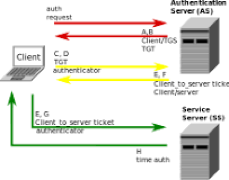
•To deal with the proliferation of authentication information, Single sign-on methods became highly desired. This is the capability to authenticate to a given system/application once and to then have all participating systems/applications ignore the requirement for another subsequent authentication challenge as the first was trusted. MIT's Kerberos in Single Sign-on replaced the UNIX logon program. Directory servers enabled the trust and deferral as they maintained the one true identity of user credentials common to many systems. Synchronizing passwords among systems with scripts gave rise to some standardization. With Single Sign On (SSO) application and the growth of IDaaS (Identity as a Service) companies have responded to the need of overwhelmed help desks and directory administrators dealing with forgotten lost or cancelled identity elements.
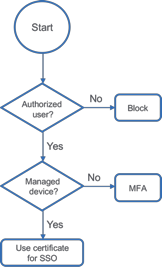
•There are many approaches to single sign-on but Security Assertion Markup Language SAML based single sign-on is the most widely adopted standard. SAML is an open-standard with a concrete definition for both the Identity Provider and the Service Provider implementations. Any correctly implemented SAML-compliant Identity Provider will be able to federate with a company directory or application (to establish trust and perform the single sign-on; despite being comprised of multiple authentication challenges). Single Sign On became attractive only when companies wanted to enforce multi-factor authentication and perform all types of reporting on user logins and access to applications.
•With Multifactor methods, security engineers and auditors were able to mitigate the multi-egg/one basket fear because SAML offered greater security of identity by not passing passwords. Passwords can be eliminated completely from many application repositories by using SAML because SAML makes use of a mechanism (known as digital signatures) to verify that a message comes from a trusted sender. That message will contain the user’s unique ID (such as an email address) to identify them. Fewer stored passwords equals more security.
•With the advent of SSO companies gain benefits from the “Federation” of different directories. Consolidation benefits enterprise-grade security controls as well improves worker productivity. Some examples include:
•Mirror security settings for an internal network (such as their File Sharing security settings) and make them meaningful for web-based applications
•Report on access to applications (who uses what and when)
•Reduce password sprawl and the risk of phishing
•Reduce help desk tickets for forgotten passwords!